
Automating Term Loan Cash Flow Calculations in TreasuryView Cloud Workspace
This walkthrough demonstrates how TreasuryView automatically calculates the complete interest and principal repayment schedule for a term loan — replacing manual Excel-based interest calculations with a real-time, market-data-driven Cash Flow engine. Adjusting a single deal parameter instantly regenerates the full amortisation schedule, projected interest payments, and Cash Flow outlook across your entire Debt Portfolio.
Tip: When to use this walkthrough: Use this guide whenever you need to recalculate a term loan's Cash Flow schedule — for example, after a reference rate reset (e.g., EURIBOR fixing), a Nominal prepayment, a margin renegotiation, or when modelling the impact of an interest rate change on future debt service costs.
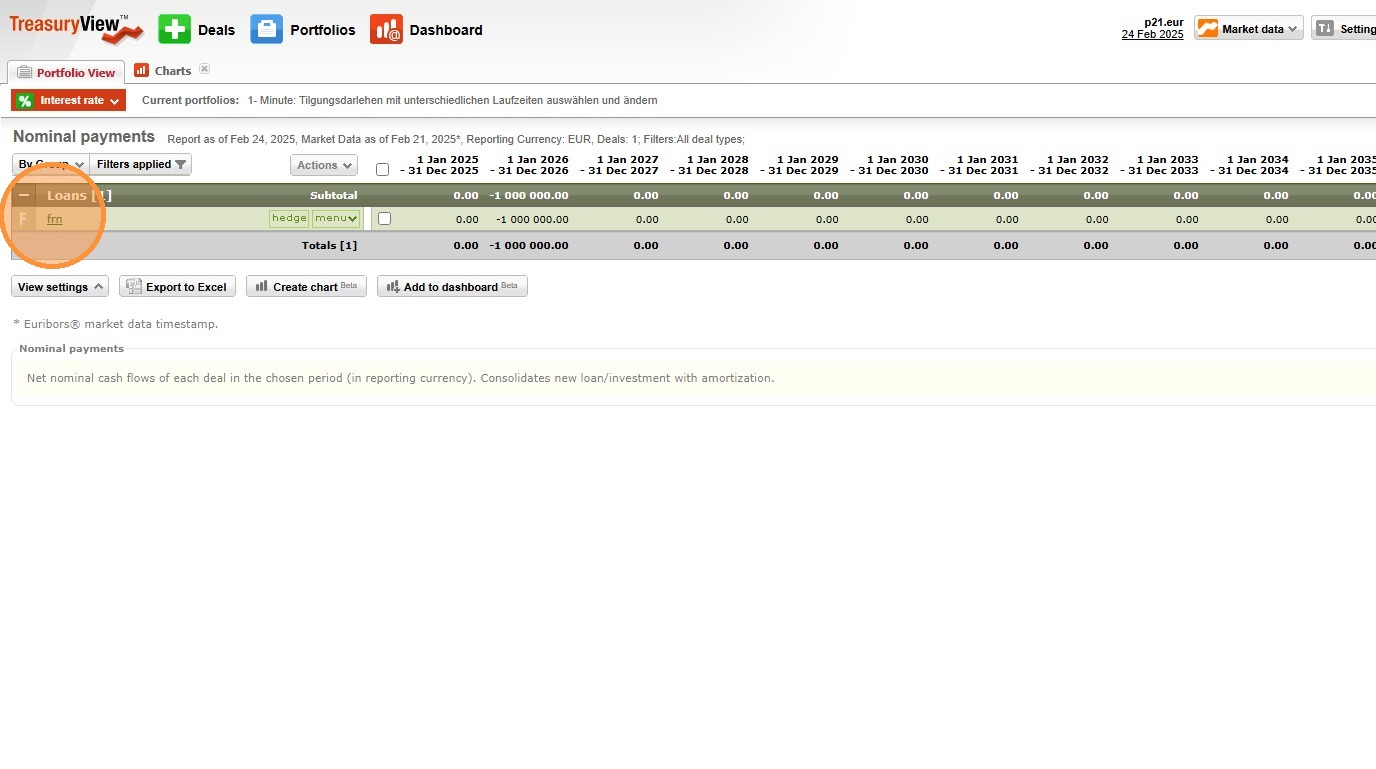
1. Open the Target Term Loan in the Debt Portfolio
Navigate to your TreasuryView Cloud Workspace Debt Portfolio and click on the relevant term loan transaction to open the deal detail view.
System logic: TreasuryView stores the complete parameter set for each term loan — including Nominal, Value Date, Maturity Date, interest rate configuration, and amortisation type — within the deal record. Opening the transaction loads all current parameters into the calculation engine, ready for review and adjustment before triggering a recalculation.
2. Review and Adjust Term Loan Parameters
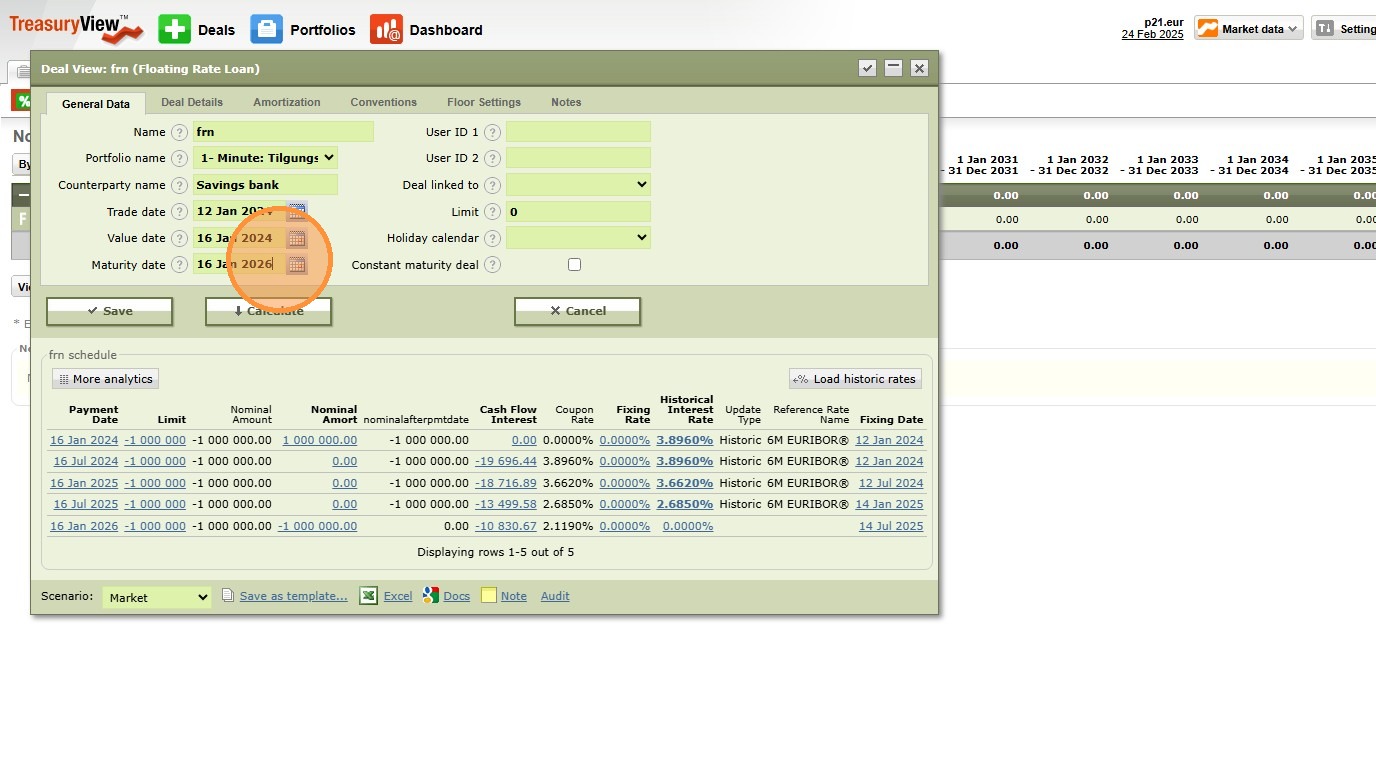
In the deal detail view, review the current parameter configuration and adjust any fields that have changed or require updating. Common adjustment scenarios include:
- Reference rate reset — Update the current EURIBOR or SOFR fixing to reflect the latest rate period
- Nominal prepayment — Reduce the outstanding Nominal to reflect a partial early repayment
- Margin renegotiation — Update the Margin field to reflect revised credit spread terms agreed with the Counterparty
- Maturity extension — Extend the Maturity Date to reflect an amended loan agreement
- Payment Frequency change — Adjust the payment interval following a loan restructuring
System logic: Each parameter in TreasuryView's deal configuration feeds directly into the Cash Flow calculation engine. The Nominal determines the interest base; the rate configuration (Fixed Rate or Margin + Reference Rate) determines the per-period interest amount; the Payment Frequency and Day Count Convention determine payment timing and accrual fractions; the Amortisation Type determines how the Nominal reduces between periods. Changing any single parameter cascades through the entire forward Cash Flow schedule — which is why manual recalculation in Excel is prone to error, particularly when multiple parameters change simultaneously.
3. Trigger the Cash Flow Calculation Engine
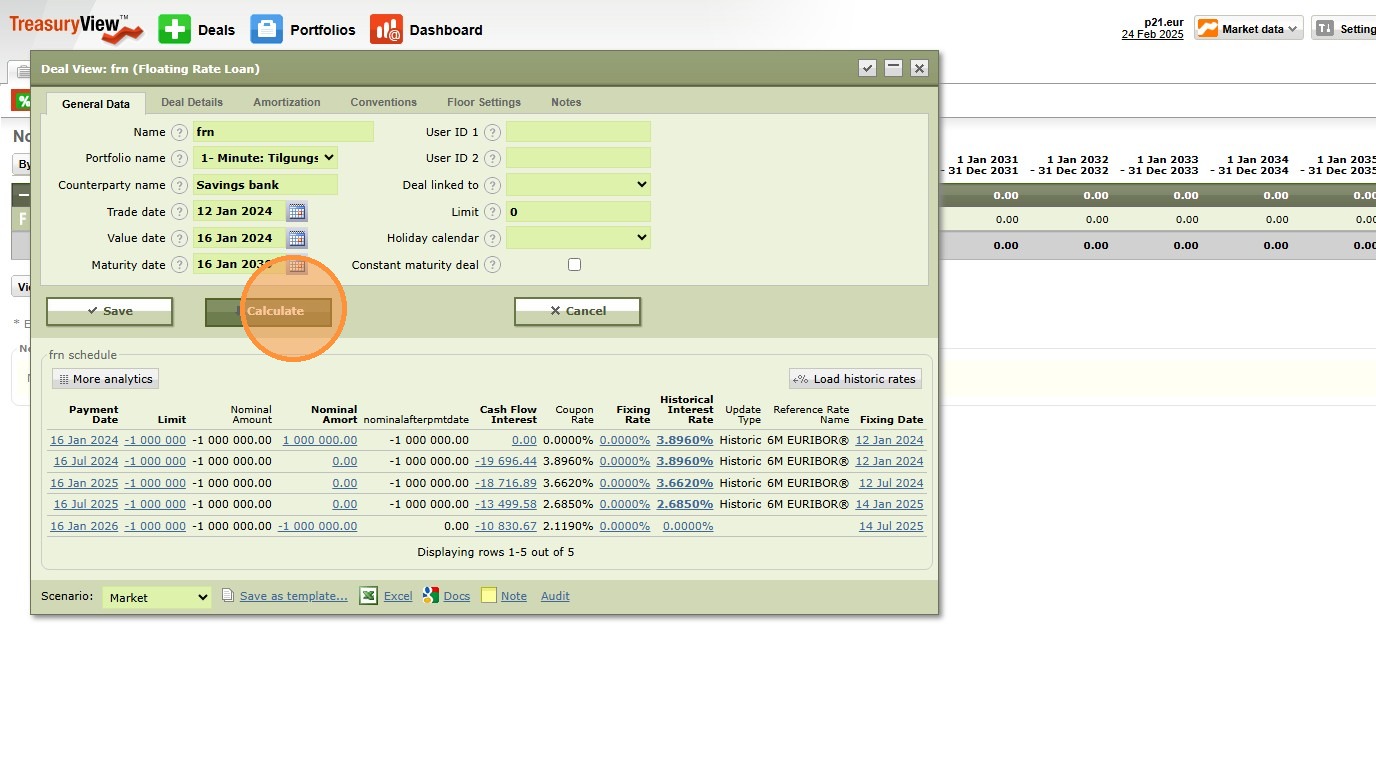
Click "Calculate" to execute TreasuryView's automated Cash Flow calculation.
What happens when you click Calculate: TreasuryView's valuation engine performs the following in sequence:
- Reads the current Nominal, rate configuration, Payment Frequency, Day Count Convention, and Amortisation Type from the deal record
- Generates a complete period-by-period amortisation schedule from the Value Date to the Maturity Date
- Calculates the exact interest amount for each payment period, applying the correct Day Count Fraction for broken periods, end-of-month adjustments, and public holidays
- For floating-rate loans: applies the current market reference rate curve (e.g., EURIBOR forward curve) to project future interest payments based on market-implied rate expectations
- Aggregates all interest and Principal Cash Flows into a consolidated timeline
- Updates the total outstanding Nominal balance for each period based on the Amortisation Type
The entire calculation executes instantly — replacing what would otherwise require a manually maintained Excel model with complex DAYS360, EDATE, and IF-formula chains.
4. Review and Validate the Generated Cash Flow Schedule
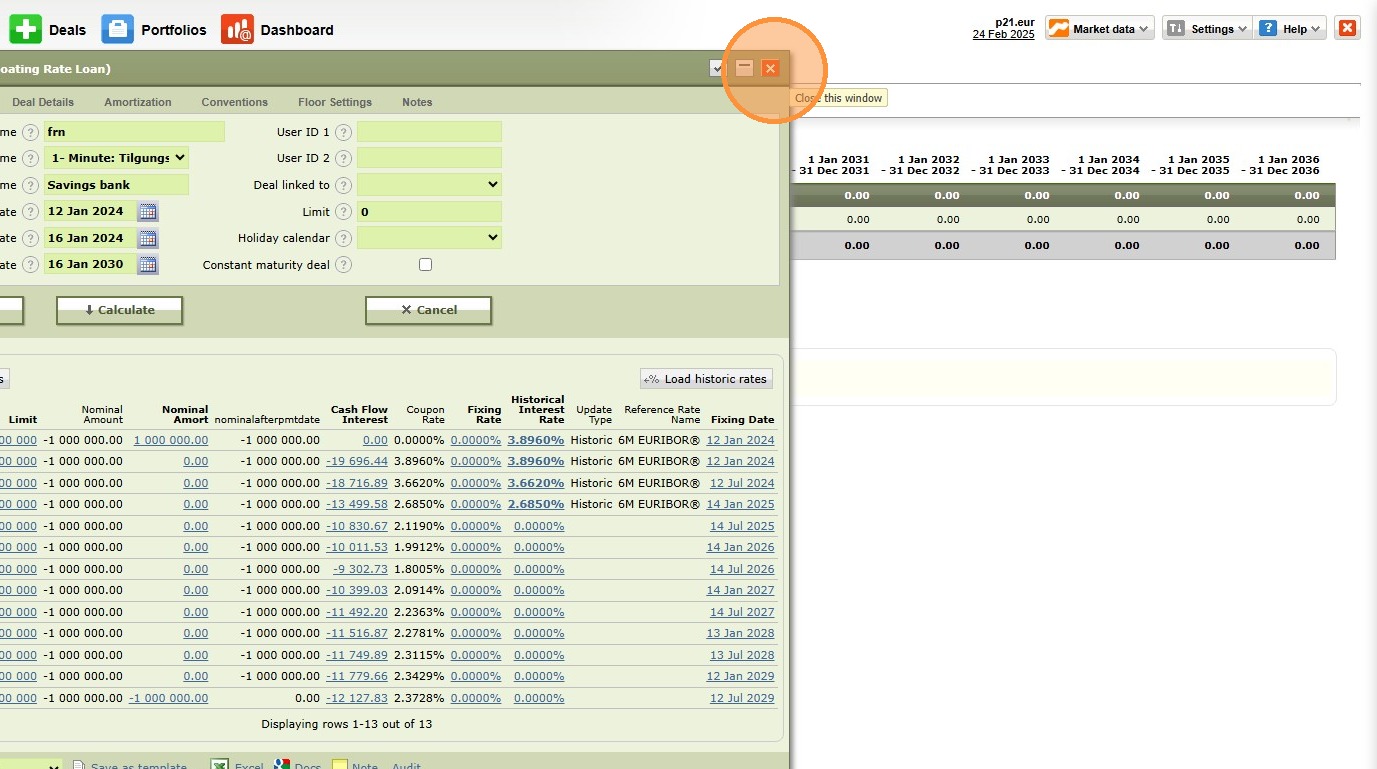
Inspect the automated Cash Flow schedule generated by TreasuryView. Verify the following before saving:
✅ Payment dates align with the loan agreement's payment calendar, including correct business day adjustments
✅ Interest amounts per period reflect the correct Nominal balance, rate, and Day Count Fraction
✅ Nominal balance reduces correctly between periods according to the configured Amortisation Type
✅ Maturity Date repayment reflects the correct outstanding Principal balance (for Bullet loans: full original Nominal; for Annuity/Linear: residual balance after scheduled amortisation)
✅ Total interest cost across the loan's lifetime is visible and consistent with internal budget assumptions
Why validate before saving? The Cash Flow schedule feeds directly into TreasuryView's Debt Portfolio Analytics, interest rate risk reports, and Cash Flow forecasts. An unvalidated or incorrectly parameterised calculation will propagate through all downstream reports — making pre-save validation the most important quality control step in the process.
Tip: What You Can Do with the Output
Once the Cash Flow schedule is calculated and saved in TreasuryView, the results feed automatically into:
- Loan Cash Flow Forecast — projected interest and Principal payments aggregated across your entire Debt Portfolio, by month or quarter
- Interest Rate Sensitivity Analysis — model the impact of a +100bps or -100bps rate shift on future debt service costs directly from the deal record
- Refinancing Profile — TreasuryView visualises upcoming Maturity Dates and Principal repayment spikes, enabling proactive refinancing planning
- Board and Bank Reporting — the calculated schedule can be exported directly as a structured Cash Flow report for lender reporting, covenant compliance, or board-level treasury updates
5. Key Concepts Referenced in This Walkthrough
- Term Loan — A loan with a defined Nominal, fixed repayment schedule, and Maturity Date; the most common instrument in a corporate Debt Portfolio
- Amortisation Type — The structure governing how Principal is repaid: Bullet (at maturity), Annuity (fixed total payment), or Linear (equal Principal instalments)
- Day Count Convention — The method for calculating the interest accrual fraction for each period (Actual/360, Actual/365, 30/360); a frequent source of manual calculation error
- Reference Rate — The floating benchmark rate applied to variable-rate loans; updated automatically in TreasuryView via integrated market data feeds or BYOD
- Margin — The credit spread added to the Reference Rate to determine the all-in floating interest rate for each period
- Payment Frequency — The interval between interest and/or Principal payments; determines the number of Cash Flow periods across the loan's lifetime
- Cash Flow Schedule — The period-by-period table of projected interest payments, Principal repayments, and outstanding Nominal balances from Value Date to Maturity Date
Alert: Troubleshooting
- "Calculate" produces no output — Verify that all Mandatory Fields are populated, particularly Maturity Date and Payment Frequency; the engine cannot generate a schedule without a defined end point and payment interval
- Interest amounts appear incorrect for floating-rate loans — Check that the Reference Rate is correctly selected and that TreasuryView's market data feed is active and returning a current rate fixing
- Broken period interest looks wrong — Verify the Day Count Convention setting matches the contractual terms in the loan agreement; Actual/360 and 30/360 produce materially different results on broken periods
- Nominal balance not reducing as expected — Confirm the Amortisation Type is set correctly; Bullet loans maintain full Nominal until maturity, while Annuity and Linear loans reduce the balance each period
- Payment dates shifted vs. loan agreement — Review the business day convention and holiday calendar settings; TreasuryView adjusts payment dates for non-business days using the configured adjustment rule
6. Need Expert Assistance?
If you require a guided session covering interest rate scenario modelling, floating-rate Cash Flow projections against current forward curves, or Debt Portfolio-level Cash Flow forecasting across multiple term loans — feel free to schedule a session at your convenience.
