TreasuryView

How to track remaining debt at reset and renegotiation dates, without spreadsheet recalculations

Last updated:

Most finance teams only track what is due this month, not what their debt looks like at future reset or refinancing dates. TreasuryView automates that view, without spreadsheet recalculations.

Still unclear how much debt will be left at your next reset or refinancing date?

Many mid-market finance teams track only what is due this month, and not what happens at critical dates such as loan rollovers, refinancing points or interest rate resets. That leaves you scrambling when banks or management ask: "What is left on this facility next quarter?"

TreasuryView fills that gap, as the three points below show.
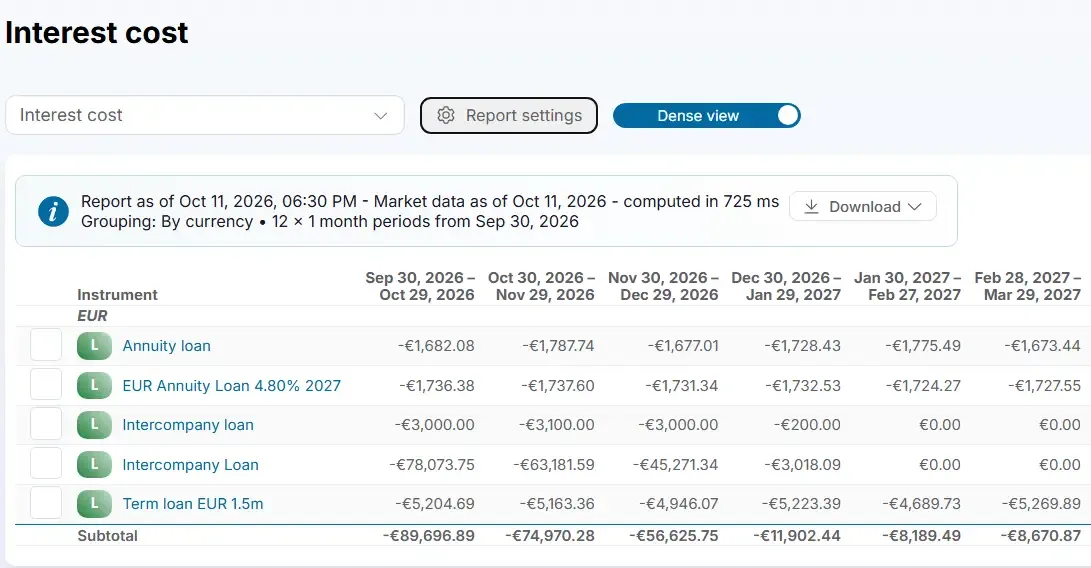
See remaining debt tracking at reset dates in an interactive demo

With TreasuryView you can:

  • See remaining debt at key dates

    Filter by loan, entity or group and see the remaining balance at future reset or maturity dates.

  • Simulate new terms or extensions

    Test how changes in duration, margin or structure affect your debt position before you renegotiate.

  • Built for real-life loan structures

    Handle shareholder loans, intercompany deals, revolving credit and annual rollovers without custom Excel workarounds.

See TreasuryView in action: remaining debt tracking at reset dates

No IT needed, no setup fee. TreasuryView shows your remaining debt at each reset or refinancing point, using your actual transaction data and amortization logic. This helps you prepare for refinancing and adjust your loan strategy, with less guesswork. The system tracks principal balances, rate resets and upcoming maturities using forward rates and your payment schedules, so there are no manual recalculations.

Start by migrating the transaction data in your spreadsheets

Full functionality free for 30 days. Secure sign-up in under a minute. No payment method needed, no software to install. The trial ends automatically.

More ways TreasuryView saves time with automated reports

FAQ: automating reports in TreasuryView

How can I import my existing spreadsheets into TreasuryView?

You can import your existing spreadsheets using the built-in Excel upload templates, with no IT or technical setup required. The platform is designed for finance teams, so you can migrate existing loan or hedge data and start generating reports. TreasuryView structures your data and creates a single source of truth.

Key benefits:

  • Fast Excel-based data import
  • Structured, validated data migration
  • Dashboards and insights as soon as your data is loaded
  • No IT involvement needed
Do I need IT team help to transfer the debt transaction data to TreasuryView?

No, you do not need your IT team to transfer debt transaction data into TreasuryView. The platform is self-service and built for finance professionals: upload data using simple Excel templates or guided forms, without any technical setup or integration.

Key advantages:

  • No IT involvement, and a free sign-up
  • Easy Excel or form-based migration
  • Quick onboarding, depending on the number of loans
  • Full control and immediate access to reports
Do I need to upload all data at once to test TreasuryView?

No. You can start with just a few loans or transactions to see portfolio insights, reports and dashboards. Even partial data gives you an impression of the functionality before a full migration.

Key benefits:

  • Start testing with minimal data
  • Visibility from the first entries
  • Gradual, low-risk onboarding
  • No IT setup or waiting period
How does TreasuryView handle automated reporting of treasury positions?

TreasuryView automates the reporting of treasury positions through dashboards and customizable reports that replace manual spreadsheet work. Debt, hedge and intercompany loan data is centralized in a single source of truth, so audit-ready reporting is available at any time. Reports can be shared as live dashboards or exported for stakeholders.

Key advantages:

  • Automated position reporting
  • Customizable layouts for banks, auditors or management
  • Audit trail and version control
  • No manual updates or consolidation needed for the reports
What level of customization can TreasuryView provide for reports?

You can tailor reports to your company's structure, reporting frequency and stakeholder needs. Adjust layouts, metrics and filters to create management, audit or bank-ready reports that update with your data. Reporting adapts to you, not the other way around.

Key benefits:

  • Customizable report layouts and dashboards
  • Data synchronization
  • Metrics for FP&A, compliance or audit use
  • Export or live sharing
Can TreasuryView help identify refinancing opportunities?

TreasuryView helps you identify and model refinancing opportunities across your entire debt portfolio. Its scenario modelling tools let you simulate new funding structures, interest rate paths or repayment options to compare costs and timing before you commit to any changes.

Key benefits:

  • Modelling of refinancing scenarios
  • Visibility of maturing loans and rates
  • Cost comparison across funding alternatives
  • Support for proactive, data-driven refinancing decisions
What is a loan rate reset date, and why does it matter for debt tracking?

A rate reset date is when the interest rate of a fixed-rate or floating-rate loan is recalculated. Floating reference rates are typically based on a benchmark rate such as EURIBOR or SOFR plus a margin. At this point the remaining principal, the upcoming payments and the total debt cost all change. TreasuryView recalculates debt positions at each reset date using forward rates and your actual amortization schedule.

Ready to see your remaining debt at every reset and refinancing date?

See more answers in our FAQ or get in touch.